
OmniCap
Capture
Check
Quality check of the 360° content has been integrated in both OmniCap and OmniConnect tool
Recognise
Core capturing
The OmniCap capture suite solution was designed with the purpose of managing multiple 360 and mixed camera types for professional productions. It employs Broadcast Hardware and pipeline (4K resolution, 3D stereoscopic capture, Black Magic Design MultiView Units and SDI+Ethernet camera connectivity) to manage up to 36 cameras simultaneous placed on a set. The system supports multiple camera types and configurations in a broad range of mounting and imaging options including shader-based live stitching, safe-zones, camera parameter controls, real-time effects, virtual camera movements and integration of 3D elements into the live scene as required.
In order to support high quality on-set capture as well as post production flows, the OmniCap system also includes a 360 Desktop player with integrated Tracking, Automatic Object Detection and Classification, Camera Path Generation and locally running or Cloud-based support for Quality Control.
The quality check
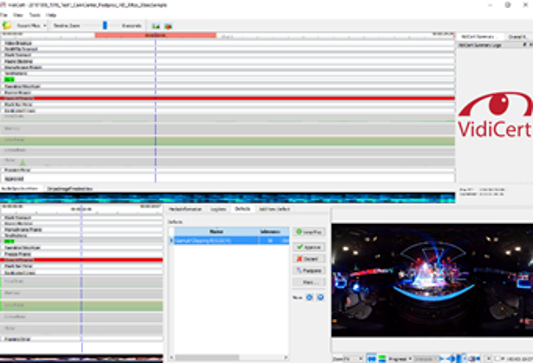
This component is responsible for the quality check of the 360° content and has been integrated in both OmniCap and OmniConnect tool. It is able to detect a variety of defects commonly occurring in 360° video like blurriness, signal clipping, noise, flicker and several others.
The quality check component reports of the detected defects to the user in a separate application named “VidiCert Summary” (www.vidicert.com), which opens automatically after the processing of the video has finished. It provides a comfortable tool for quickly inspecting the detected defects in the video, where each detected defect is shown in a separate timeline either as bar or as graph. A player is integrated for navigating within the video.
The tracking and object detection
This component provides functionality for tracking a user-defined template and for detecting and tracking automatically salient objects (persons, cars etc.) in the scene.
The single-object tracker is useful for tracking user-defined regions, such as hotspots, automatically throughout the 360° video. It is parametrized by a text-based configuration file, where all important algorithm parameters can be modified, if needed. The underlying algorithm utilizes only the CPU and therefore can be run also on systems without a GPU.
The object detector is based on the YoloV3 algorithm, a state of the art object detector based on deep learning. It is able to detect object classes which are commonly occurring in video content like persons, cars and many others. It was extended significantly, in order to be able to not only detect, but also track the detected objects throughout the scene. Furthermore, several steps of the algorithm have been optimized in order to be able to process the input video in realtime.